Remove a single repost in TikTok
Open your TikTok profile and find the post in your repost tab. Open it, tap Share, then choose Remove repost. TikTok’s help also describes removing a repost by pressing and holding the post. Afterwards, check that it no longer appears in your repost list.
This is the simplest route for an accidental repost and requires no additional service. If the option is missing, check the active account and the post. Clearing watch history is a different action. The official help we checked describes individual repost removal, rather than a universal control for clearing the entire list.
Understand what happens to replies
TikTok states that removing a repost also removes its associated replies. These are replies to your repost, which are distinct from ordinary comments on the creator’s original post.
Simple Fire removes your reposts. It is not a tool for deleting other creators’ original posts, your uploaded videos, likes or private conversations. Completed cleanup cannot be undone in Simple Fire. Sharing a post again requires finding it and making a new repost in TikTok; do not expect that to restore replies to the previous repost.
Start a repost cleanup in Simple Fire
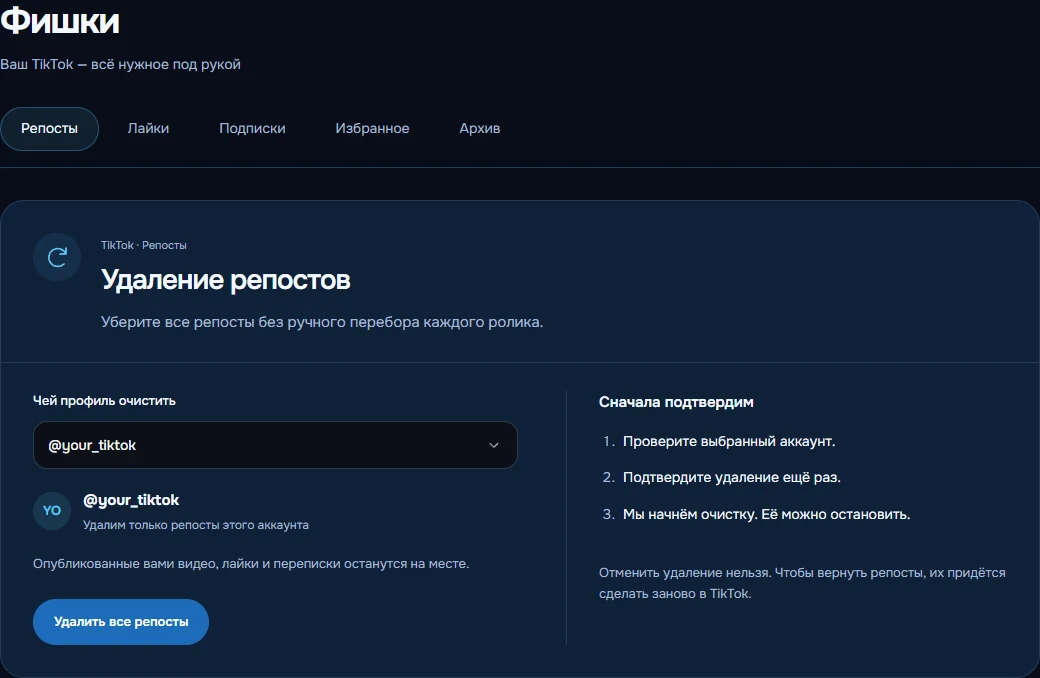
Sign in on the website, connect TikTok in Accounts and open Tools → Reposts. Check the username under “Which profile to clean”. When several accounts are connected, select the intended one; the task belongs to that account.
Choose “Remove all reposts”. Confirm the account at the first step. At the second, enter its username, acknowledge the consequences and confirm the start. Cleanup begins only after that final confirmation. This tab has no individual-post selection or filter; use the manual method above when you want to keep some reposts.
Avoid adding new reposts while cleanup runs. You can close the page because processing happens on the server. This is a task you start explicitly, not a permanent rule for removing future reposts. Scheduled streak messages take priority, so cleanup may wait for the account to become available.
Check progress or stop processing
Recent runs show confirmed removals and any reason for stopping. Stop prevents further processing, although an action already underway may finish. Removed reposts are not restored.
“Reposts are no longer visible” does not confirm that every repost was removed. If TikTok stops displaying the tab, check your profile in the app. An uncertain final action is not retried automatically; inspect its result before starting again.
A large list may not finish in one run. Tasks are limited by time and the number of processed reposts. Sign-in checks, interface changes and TikTok restrictions can also stop cleanup. There is no promised completion speed, unlimited capacity or removal of account restrictions.
Access and pricing
Tools require the owner’s website dashboard and an active paid subscription or eligible trial for the selected TikTok account. New users can receive 72 hours after a successful connection, once per Simple Fire profile and TikTok account. Access then costs RUB 50 per account per calendar month.
Automatic renewal is a separate setting in your dashboard. If access has expired, renew it and check the connection before starting again. Wallet funds alone do not purchase access. Likes and following have separate tools; repost cleanup does not perform those tasks.
Continue to your account
Check access and settings in your dashboard. Actions begin only after you confirm.
Open repostsSeeing a different interface? Tell us.